Wednesday, November 9, 2011

Excellent Strategy in Landing Page Optimization

Now days everyone’s talk about POPCORN - Internet Marketing Conferences running at Las Vegas Convention Center, Las Vegas, Nevada, and this Conference from November 8 to November 10.

So first day Brad Geddes, Tim Ash, and Joanna Lord are here to share some great landing page optimization ideas.

Joanna Lord who started to say landing page optimization. She’s going to break down the landing page optimization into actionable steps.
Your Landing Page Needs to Be/Have
  • clean and concise
  • bullets, small paragraphs, drop unneeded fields
  • call to action
  • big, clear, visually appealing, buzz word usage
  • branded, certified, trusted elements

Two sides of advanced landing page optimization

In-house tactics

How easy can you make it for everyone in the organization to create good pages? You need:
  • integration
  • education
  • checklists
  • integrate your CMS
  • automation
  • landing page templates
  • auto-expire pages
  • preview/Q&A system
  • champion results
  • data collection
  • spotlight efforts
  • circulate & educate

The more info you give your team to make good decisions, the less you have to fix later. You can push things out faster, but they’ll all have a good, solid foundation. Talk to your devs. Show them what you do, and ask them if they can see anything that can be improved. Recognize people’s efforts.

On-site tactics
She uses Starbucks as an example. Their landing page has a lot going on. They’re trying to do a lot on one page. When she goes to this page, she feels ok, she doesn’t think their bounce rate is bad. Hopefully they tested everything on the page. What you should have on the page:
  • Secondary conversions
  • E-mail addresses
  • RSS/Social subscribers
  • Social counts
  • Become member
  • Downloads/views
  • Engagement
  • Feedback
  • Loyalty programs
  • Virtual high five
You need to understand your conversions, and you need to understand them well. We all know how important it is to drive people to your site, but also to have them spend time on the site. As landing page testers, we owe it to our clients to push them up. Is there one facet of the page that should be highlighted over another?

Brand Strengthening
If you want to get serious about winning on your pages, you need to look at how you’re presenting your brand across that page.

Mission Statements
Ask yourself where else you can strengthen your brand on the page, and then test it.

Testimonials
Use words you know your target market will appreciate

Awards
If you’re going to have an award, it’s important to have something unique to you, not what everyone else is doing. Host awards if you need to, but give credit where it’s due.

Customer Counts
Do what Mail Chimp does. We’re the type of consumer who wants to see badges. Don’t just use text.

Logos
If you have awesome customers or partners, use their logos

Consistency
If you choose a theme, use it throughout the page, from the theme to the images. Make it beautifully streamlined. There should be an emotional connection to how a page feels. That can be one of the easiest ways to tell a client you’re going to get results.

Badges
If you have free shipping, free returns, make sure there’s an element that draws attention to it. Text is too easy to overlook.

Press Mentions
And here, Joanna was about to mention the press mention on our own Outspoken Media page, but she was told she only had a couple of minutes left, so she skipped to the end!

Postivity
She didn’t get to this one, but I’m going to assume she means keep your page positive. :-)
It’s a lot of work, there are a lot of great tools you can use. You have to test. And that’s it!
Now we move on to 

Brad Geddes. He says almost every activity ends with either a phone call, or a form being filled out, so let’s look at forms.When someone fills out a form, they get something in return. What’s the value? It doesn’t matter. It’s the perceived value that matters.

What’s the minimum amount you need to know? Is the value of what you ask equal or greater than what they get in return? Because if it is, they’re not going to fill it out. If the values are equal, you’ll have good conversion rates.

Three Ways to Get at What People are Looking At
  • Eye Tracking – You get a wealth of very accurate information. But it’s very time-consuming. It’s expensive, and you can’t use it as a threshold for doing stuff unless you have a big project. Tool: Tobii
  • Mouse Tracking – It’s accurate, although not perfect, but good enough. It’s less versatile because it’s not involuntary. You move a mouse whereas you don’t consciously move your eyes. Tool: Crazyegg and Clicktale
  • Software Algorithms – The brain looks for lines, certain shapes, motion, flicker, etc. They’re less accurate, not versatile, not good at “considered response,” but they’re very inexpensive and offer instant turnaround. (He didn’t mention a specific tool for this one)
Use data to develop your pages, and cater to what people are looking for.


FB comment Box Ends -->

Wednesday, August 31, 2011

Google Starting adwords ads review on 6 September


Google adwords has announced ad review process started from coming week.

Let you know about some upcoming changes to the types of adwords ads review.

What’s happening?
Starting on 6 September, adwords begin reviewing paused ads the same way review active ads. This means that new and existing paused ads will be sent through the standard ad approval process. As a result, if your paused ads violate one or more of AdWords advertising policies, they are likely to get disapproved.

Why?
Google Adwords says “we’re proactively reviewing paused ads to eliminate unnecessary delays in getting your ads approved and to ultimately enhance your experience with Google AdWords.”

When?
Starting on 6 September, adwords begin reviewing new paused ads, followed in the coming weeks by the review of existing paused ads.

To learn more about our ad approval process, please see
http://adwords.google.com/support/aw/bin/static.py?hl=en_GB&topic=1316596&guide=1316546&page=guide.cs

To learn how to get your paused ads re-reviewed if they were disapproved, please see
http://adwords.google.com/support/aw/bin/answer.py?hl=en_GB&answer=116204

For more details and answers to frequently asked questions, please see
http://adwords.google.com/support/aw/bin/answer.py?hl=en_GB&answer=1408745


Sincerely,
The Google AdWords Team

FB comment Box Ends -->

Thursday, August 4, 2011

Google Plus Vs Facebook Funny Images [A part of Jokes]


Google’s new attractive social networking platform Google + has been launched before couple of months ago. As Google Plus rolled out, Facebook goes down!

If you don’t know then Google+ (pronounced and sometimes written Google Plus, sometimes abbreviated as G+) is a social networking service operated by Google Inc. Google+ integrates social services such as Google Profiles and Google Buzz, and introduces new services Circles, Hangouts, Sparks, and Huddles.
Google Vs Facebook Comparison
Here are some Funny Google Plus vs Facebook Images [Jokes]
 Comic Joke on Google vs Facebook: Wait! Don’t you realize!? He’s the same as I am! Well, without ads (for now)… OR games… OR confusing privacy settings.. Err… Nooo! Please don’t go!.. Eh… They made a movie about me!

Funniest quote in the above image is : Dude sell it before it’s too late…. Ha ha…

 Google Plus taking Facebook coffin: Some Google plus faces taking Facebook coffin hanging twitter on it.

Google plus growth and number of million users: In 16 days of launch G+ hits 10 million where Facebook and twitter had taken years to reach there.


Google Plus first generation user:


Another Google Plus comic: 


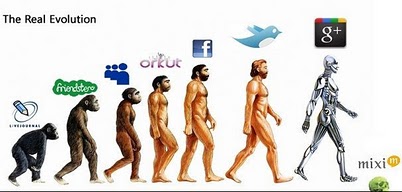
Google Plus Real Evolution:


Google Plus Angry on Facebook, Yahoo!, IE and Mac


 Google Plus sailing over the Skype facebook and Microsoft.


Google Plus being a reason of cheating a wife over husband as Facebook 


Google Plus: I’m not doing shit today (mission accomplished).


Google Plus Are you addicted image:


Google Plus Let’s not Fight:


Google Plus has strategy and holds it to the last and delivered it finally.


After all It's fun........so enjoy :)


source @ http://bit.ly/nQgMHi
FB comment Box Ends -->

Saturday, July 30, 2011

Important Click-to-call enhancement to Google AdWords text ads

If you currently have a phone number in your ad text or have plans to start adding your phone number in an ad, this is an important notice that in the coming weeks, AdWords will be launching a new enhancement to AdWords ads that will impact charges on clicks to these numbers.

Mobile users connect more easily with advertisers, all non-clickable phone numbers displayed in AdWords ad text will be automatically converted into a Click-to-call number.  Currently when advertisers enter a phone number directly into their ad text instead of using Call Extensions, the phone number is not clickable and will not generate a call. This can be a frustrating experience for mobile users who attempt to initiate a call to this phone number.

The new Click-to-call enhancement ensures that all phone numbers shown in AdWords ads are clickable and allows users to easily place calls from their mobile device. If your ad text includes a phone number, you will begin to receive clicks and calls on this number once the enhancement is enabled in your account. As with phone calls placed via a Call Extension, you will be charged for clicks on your phone number that result in a call.

Please note that AdWords policy does not allow for phone numbers to be inserted into ad headlines. As with all Click-to-call ads, advertisers will be charged when a user either clicks on the headline or the phone number listed in the ad. Please see below for additional information regarding this change.

Which phone number shows?

If you are currently using both Call Extensions and a phone number in your ad creative, only the newly clickable phone number in your ad creative will show. This is designed to help reduce user confusion from seeing two potentially different numbers.  If you would like your Call Extension number to display, simply delete all phone numbers from your existing ad text by following these steps. You'll also receive an additional line of ad text displaying your phone number if the Call Extension is used.

Measuring results

You'll be able to review how many calls you receive on the clickable phone number listed in your ad text for each campaign, ad group, keyword and ad on the "Campaigns" tab in your AdWords account. Just select the "Click-type" option under the "Segment" drop down and view your report.  Please note that since these are not calls generated from a Call Extension, they will not be reported in the Extensions tab reports.

Recommendations for featuring a phone number

You can simply leave your phone number in your ad text and benefit from this change which will automatically make your phone numbers clickable and enable users to call you. However, to get the most value from click-to-call, we recommend that you remove your phone number from your ad creative and create a Call Extension with your phone number directly.  This has several benefits. With a manually created Call Extension your number will appear as an additional line of ad text which frees up space in your ad creative for other promotion. In addition, when you create a Call Extension, your phone number appears on a separate line in the ad, and you're able to take advantage of other powerful enhancements such as Vanity Numbers, Call-only and Call Metrics reporting.


Sincerely By,
The Google AdWords Team

adwords.google.com
FB comment Box Ends -->

Wednesday, July 27, 2011

Google Panda Updates 2.3


Latest Google Panda Update 2.3 has been rolled out. If you see a change in your traffic, you’ve been probably been hit by the recent Panda update. This update is relatively smaller as compared to the previous versions. Let’s look at the previous versions of Panda update:

Previous versions of Panda Updates

The timing of each Panda update indicates that Google is re-iterating Panda update after almost every month. In my opinion Panda update has been the worst killer of all the updates to Google search algorithm simply because it penalizes the whole site instead of the exact page. The Panda will analyze all the pages of a domain, leave out the pages with duplicate or low quality content and then penalize the whole domain until the problem is corrected. Panda update also takes into consideration the quality of outgoing links. If you are linking to a content farm or low quality content, you’re likely to be effected by Panda.

There have been a lot of talk about how to get rid of Panda but none of the solutions has worked 100% in my opinion. If you’re hit by Panda, you should realize that you have to work very hard in order to get the trust of Google back. Here are the three simple steps that can lead to successful relief from Panda:

  • Remove duplicate and low quality content.
  • Remove outbound links of low quality content.
  • Wait for Google to re-index your site and sort out the problem.

Each time Panda is run, there’s a chance some hit from the last update will improve, while other sites might see traffic drops. In between updates, changes people may make specifically in hopes of fixing a Panda problem won’t show any impact until the next update is run.


FB comment Box Ends -->